

Product updates & new features
Discover the latest feature releases and product updates for our recruitment website design and marketing automation platforms. Stay up to date with SourceFlow.
Sourceflow's latest product & feature releases
September 2026
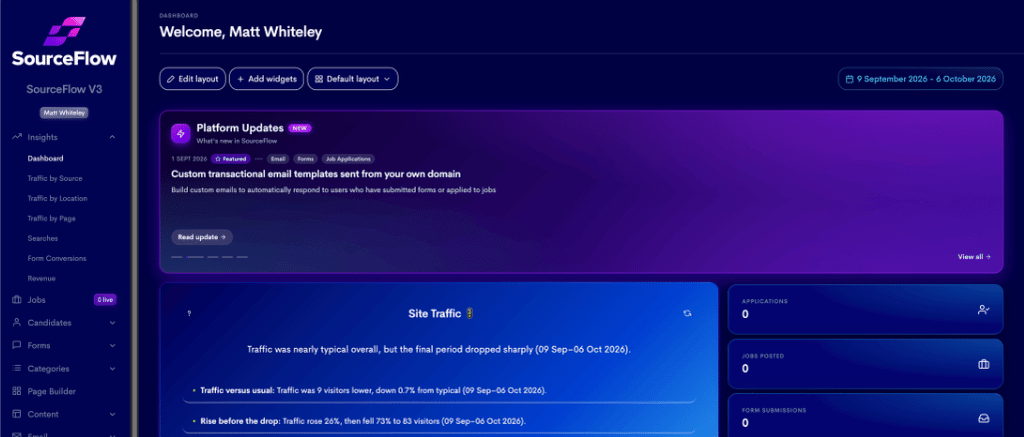
New 'Platform Updates' window added to the CMS dashboard
We have added a window within your CMS dashboard that conveys our latest product and feature releases. This is an additional area for this information - historically we housed this information solely in the left-hand navigation.
This feature enables our customers to easily learn more about our new products and features and discover how they can access them.
Log-in and check out your dashboard. You will see the platform release window at the top of the page.
New product: SourceFlow launched marketing automation platform
Our digital experience platform can now include a suite of cutting-edge marketing automation tools and cutting edge AI-communications tech. We have expanded our offering so our website platform now works seamlessly with a range of industry-leading marketing tools.
We have created the recruitment marketing automation platform because we realised that there was widespread dissatisfaction across the industry because all the generic suppliers of marketing automation tools could not fully support the needs of ambitions and techy savvy recruitment businesses.
You can learn more about the new platform on our blog.
If you would like to find out how our suite of marketing tools could work with your business, click here to book a demo with our team.
You can watch the full recording of our live launch of this product here.
New feature: Preview draft pages
SourceFlow customers can now share links to previews of draft recruitment website pages from the CMS platform. Super useful for sign-off processes.
This allows users to share drafted page builder pages with team members or clients without needing to publish them live.
This update streamlines the feedback process, enabling collaborators to review content in a full-screen preview environment before it goes public.
To share a draft, users follow these steps:
1, Navigate to the Page Builder and select a drafted page for editing.
2, Click the three dots in the top right corner of the editor and select "Share preview."
3, Configure the preview settings, including link domain, an optional label, and an expiration date (e.g., 7 days).
4, Optionally, set a password to restrict access to authorized viewers only.
5, Click "Create link" to generate a shareable URL.
The generated link provides a full-screen view of the page's last saved state, requiring no login from the recipient unless a password was set. The preview interface also includes options to view the page across different screen sizes, ensuring responsive design quality.
Users can manage multiple active preview links for a single page, with the ability to copy or revoke them as needed.
This feature is available immediately to all SourceFlow customers, enhancing collaborative workflows within the platform.